


Download Genmo – Free AI Creative Tool for Images, Video & 3D
Overview: What Makes Genmo Stand Out in the AI Creative Landscape
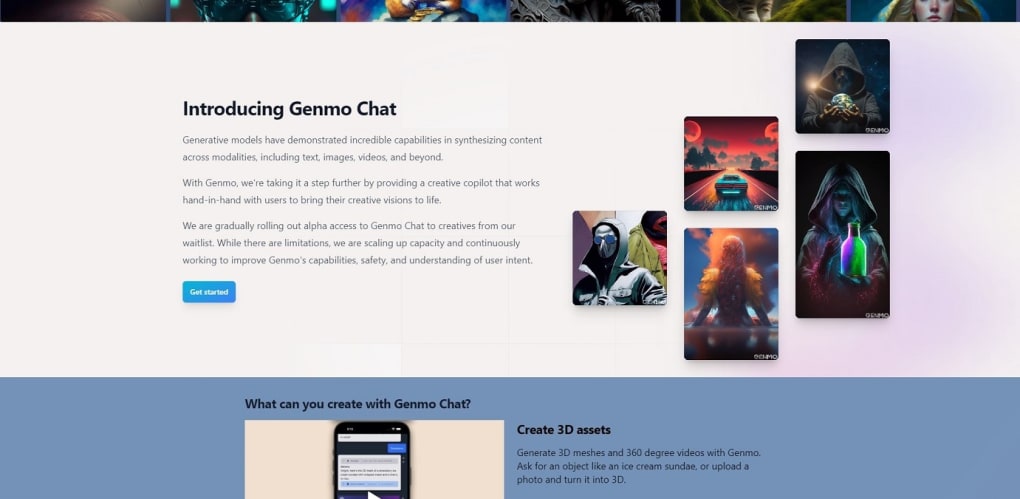
Genmo is a web‑based AI powerhouse that embodies the emerging concept of Creative General Intelligence. Unlike traditional generative models that operate in isolation, Genmo merges human intuition with a sophisticated generative engine, delivering results that feel both imaginative and highly functional. The platform is completely free to start, letting creators experiment with cutting‑edge AI without any upfront cost. Its core promise is simplicity: you can upload images, videos, or 3D assets, and within seconds the system synthesizes new content, ranging from animated GIFs to full‑length 360‑degree videos. This speed and ease of use make Genmo a compelling option for marketers, educators, indie game developers, and anyone looking to add a splash of AI‑driven creativity to their workflow.
The tool’s versatility shines through its ability to handle multiple media types. Want to turn a static photo into a looping animation? Genmo can isolate elements, apply motion paths, and render a smooth clip in moments.
Need a 3D mesh from a single image? The platform’s 3D engine reconstructs geometry, textures, and lighting, delivering a ready‑to‑export model for Unity or Blender. Moreover, Genmo’s “creative copilot” guides users away from potentially harmful content, ensuring that the generated material stays within ethical boundaries.
While the free tier provides generous capabilities, a subscription unlocks higher‑resolution exports, batch processing, and priority rendering queues.
Because Genmo runs entirely in the browser, there is no need for bulky installations or powerful local hardware. All heavy lifting happens in the cloud, which means you can work from a laptop, tablet, or even a smartphone with a stable internet connection. The platform’s user interface is clean, intuitive, and designed for both beginners and seasoned creators. Whether you’re crafting a quick social‑media teaser or prototyping a complex 3D environment, Genmo’s blend of speed, accessibility, and creative depth positions it as a standout tool in the rapidly expanding AI‑creative market. In addition, regular updates introduce new model improvements and workflow shortcuts, keeping the experience fresh and future‑proof.
Key Features & Capabilities That Power Your Creativity
- Multi‑Modal Generation: Seamlessly synthesize images, videos, 3D meshes, and 360° experiences from a single source file.
- Selective Animation: Upload an image and choose specific elements to animate, giving you fine‑grained control over motion.
- Automatic Storyboarding: Input keywords or a short script and Genmo auto‑creates a storyboard with transitions and text overlays.
- Icon & Logo Copilot: Generate dozens of icon variations instantly by describing style, color, and concept.
- Creative Guardrails: Built‑in safety filters prevent the generation of harmful or copyrighted content.
- Batch Export & High‑Res Options: Subscription users can download up to 4K video, lossless PNGs, and high‑poly 3D models.
- Cross‑Platform Accessibility: Works on any modern browser—Windows, macOS, Linux, Android, and iOS devices are fully supported.
- Real‑Time Collaboration: Share a live editing link so teammates can co‑create and provide feedback instantly.
- API Access (Roadmap): Future plans include a RESTful API for integration with existing pipelines and automation tools.
- Version History: Every project retains a full revision log, allowing you to revert to earlier iterations with a click.
Each of these features is designed with a focus on speed and usability. For example, the selective animation tool uses a lightweight segmentation model that isolates objects in under a second, then applies motion curves that can be edited in a simple timeline view. The automatic storyboarding engine leverages natural‑language processing to understand plot beats, selecting appropriate transition effects—such as cross‑fade, slide, or wipe—based on the emotional tone you specify. This reduces the time spent on manual editing by up to 70 % for many creators.
Genmo also distinguishes itself with its “creative copilot,” an AI assistant that suggests enhancements, checks for potential policy violations, and offers style recommendations. This guidance is especially valuable for users who are new to AI‑generated media, as it helps maintain quality while avoiding common pitfalls like uncanny‑valley artifacts or mismatched lighting in 3D renders. The copilot can even propose alternative color palettes or motion rhythms, turning a simple prompt into a polished, multi‑layered composition. The result is a ready‑to‑publish asset that feels like it was crafted by a professional designer rather than a generic algorithm.
Behind the scenes, Genmo’s infrastructure runs on scalable GPU clusters that automatically allocate resources based on the complexity of the request. Free users share a pool that may experience brief queuing during peak times, while premium subscribers benefit from dedicated lanes that guarantee sub‑minute render times for most projects. This tiered approach ensures that the platform remains responsive for casual experimentation while still delivering enterprise‑grade performance when it matters most.
Installation, Usage & Compatibility: Getting Started in Minutes
Step‑By‑Step Installation (Zero‑Download Required)
Because Genmo is a cloud‑native web application, there is no traditional installation process. To begin, simply navigate to genmo.ai using any up‑to‑date browser (Chrome, Edge, Firefox, Safari). The first time you visit, you’ll be prompted to create a free account using an email address or a single‑click Google/Apple login. After confirming your email, you’ll land on the dashboard where you can start a new project or explore community templates.
Creating Your First Project
1. Select a Media Type: Choose between Image, Video, or 3D Model.
2. Upload Your Source: Drag‑and‑drop a file or paste a URL.
Genmo supports PNG, JPG, MP4, MOV, OBJ, and GLTF formats.
3. Define Your Goal: Use natural language prompts such as “turn this photo into a looping 10‑second animation” or “create a 3D mesh of this chair for AR.”
4. Adjust Settings: Fine‑tune resolution, frame rate, lighting, or animation curves via intuitive sliders.
5.
Generate & Review: Click “Generate.” Within seconds, a preview appears. Use the built‑in editor to trim, add text, or swap transitions.
6. Export: Choose a format (MP4, GIF, PNG, OBJ) and download directly or share a link.
System Requirements & Operating System Support
Genmo runs on any device with a modern web browser and an internet connection of at least 5 Mbps. The service is fully responsive, meaning it works on desktop operating systems (Windows 10/11, macOS 12+, Linux distributions) as well as mobile platforms (Android 9+, iOS 13+). Because rendering is performed in the cloud, local hardware specifications have minimal impact on performance, though a GPU‑accelerated device will provide smoother preview interactions.
For power users, Genmo offers a “Desktop Mode” that opens a progressive web app (PWA) shortcut on Windows or macOS, giving the appearance of a native application while still leveraging cloud resources. The PWA can be installed via the browser’s “Add to Home Screen” feature and supports offline caching of assets for quick re‑edits, though final rendering still requires an online connection.
Overall, the barrier to entry is intentionally low. Whether you’re a student with a Chromebook, a freelance designer using an iPad, or a studio technician on a high‑end workstation, Genmo adapts to your environment, making AI‑driven creation truly universal. In addition, the platform provides contextual help bubbles and short video tutorials that appear the first time you encounter a new tool, ensuring that even first‑time users can become productive within minutes.
Pros, Cons, FAQ & Final Verdict – Should You Download Genmo?
Pros
- Completely free tier with generous limits.
- Multi‑modal generation (image, video, 3D) in a single platform.
- Zero‑install, browser‑based workflow works on all major OS.
- Intuitive UI and natural‑language prompts reduce learning curve.
- Creative copilot safeguards against harmful content.
- Real‑time collaboration and version history.
- High‑resolution export options for subscribers.
- Regular feature updates keep the tool cutting‑edge.
- Extensive template library for quick project kick‑offs.
- Secure cloud storage with GDPR compliance.
Cons
- Render queue can be slower during peak usage for free users.
- Limited offline capabilities; an internet connection is mandatory.
- Advanced 3D editing (rigging, advanced shaders) still requires external software.
- Subscription pricing may be a barrier for occasional hobbyists.
- API access is not yet available (planned for future release).
- Complex projects may need multiple render passes, extending total time.
Frequently Asked Questions
Is Genmo really free to use?
Yes, Genmo offers a robust free tier that allows unlimited project creation, basic resolution exports, and access to all core features. Premium subscriptions unlock higher‑resolution output, faster rendering, and batch processing.
Can I use Genmo on my mobile device?
Absolutely. The platform is fully responsive and works on Android 9+ and iOS 13+ browsers. You can also add Genmo as a Progressive Web App for a more native feel.
What file formats does Genmo support for export?
Exports include MP4, GIF, PNG, JPEG for images and videos, and OBJ or GLTF for 3D models. Subscribers can also download 4K video and lossless PNG sequences.
Is my data safe on Genmo’s servers?
Genmo uses end‑to‑end encryption for all uploads and stores data on secure, GDPR‑compliant cloud servers. Uploaded assets are automatically deleted after 30 days unless you save them to your account.
Do I need a powerful computer to generate 3D meshes?
No. All heavy processing happens in the cloud, so even a modest laptop or tablet can generate high‑quality 3D meshes. A stable internet connection is the only requirement.
Conclusion & Call to Action
Genmo represents a significant step forward in democratizing AI‑driven creativity. Its ability to blend human direction with generative power, all within a fast, browser‑based environment, makes it an attractive option for anyone looking to produce visual content without investing in expensive software suites or high‑end hardware. While the free tier already provides impressive capabilities, the subscription model adds professional‑grade output for creators who need higher resolution and faster turnaround.
If you’re ready to experiment with AI‑generated images, videos, or 3D models, there’s no reason to wait. Click the button below to create a free Genmo account, start your first project, and discover how quickly you can turn ideas into polished media.



.png)



